Weekly Meal Planner Template: Breakfast to Snacks, Seven Days, One Glance
weekly meal planner template with a worked seven-day family menu, grocery list examples, and simple steps to adapt the week for your own kitchen.
By Ultimate Meal Planner by Cosmo Suite · Editorial policy
Published · 8 min read
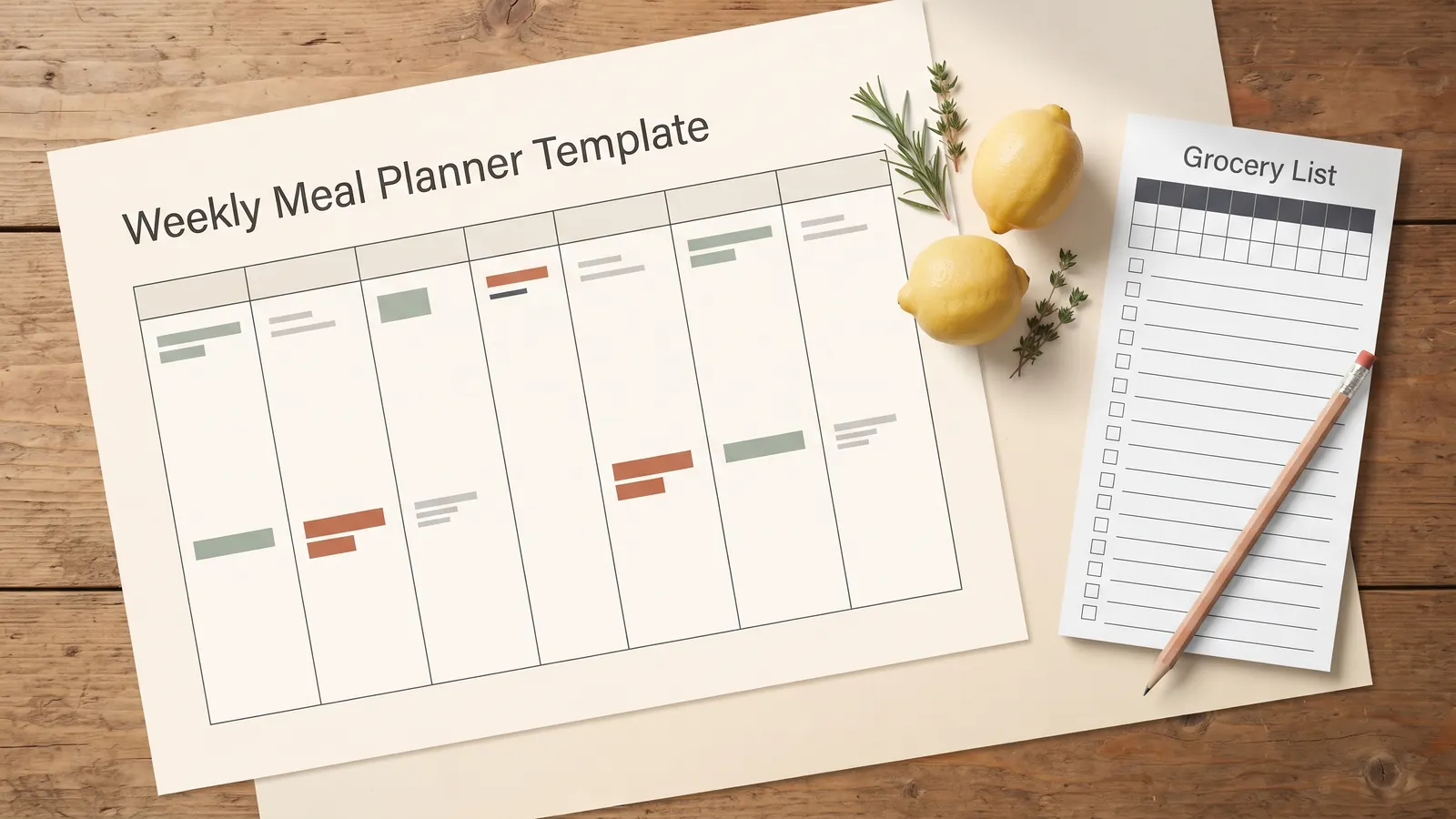
Sunday afternoon. The fridge has a few familiar ingredients, the week is filling up, and nobody wants another 6pm meeting about dinner. A weekly meal planner template is a reusable seven-day view of meals, grocery needs, and notes for the cook.
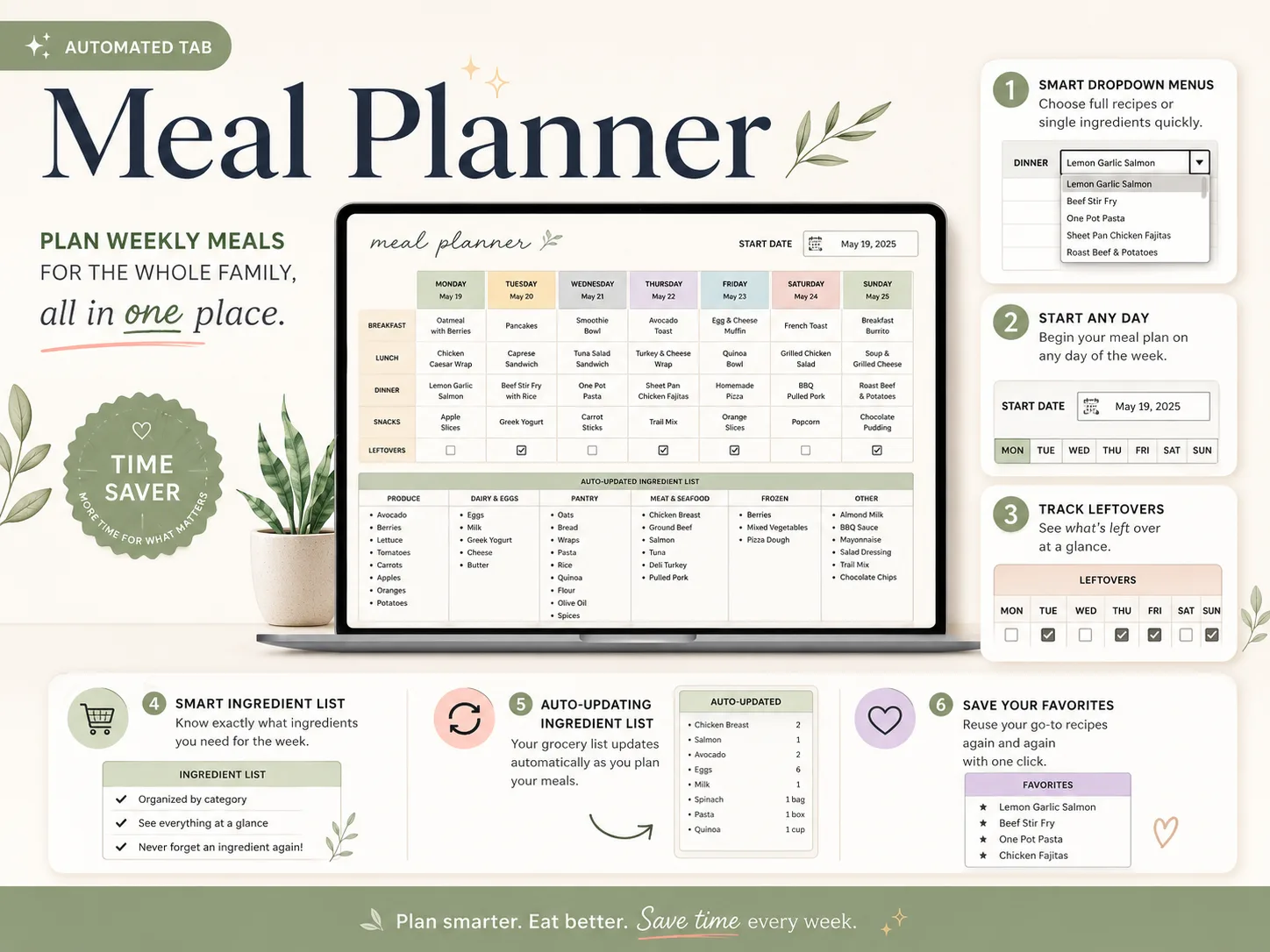
The example below uses the actual sample week shown in Ultimate Meal Planner's Meal Planner tab. It includes breakfast, lunch, dinner, snacks, and leftover notes, then shows how those choices feed the grocery list. You can use the same shape on paper, in a blank spreadsheet, or in a ready-made planner.
The page should let you scan the week, then carry the list to the grocery store without copying each meal by hand.
Before You Plan: key takeaways
- Put the meals your household needs into a seven-day view.
- Leave room for leftovers and evenings that may change.
- Build the grocery list from the selected meals, then check the pantry.
- Keep the page readable when printed or opened on a phone.
A Weekly Meal Planner Template With a Worked Family Week
A useful weekly meal planner shows the meals and the days together, so you can spot repeats, busy nights, and leftover meals before you shop. This example follows the sample week visible in the product's Meal Planner tab.
[ORIGINAL DATA] The table transcribes the meal names from the sample planner visual. The values are examples from the product, not a suggested menu for every household.
| Day | Breakfast | Lunch | Dinner | Snack |
|---|---|---|---|---|
| Monday | Oatmeal with berries | Chicken Caesar wrap | Lemon garlic salmon | Apple slices |
| Tuesday | Pancakes | Caprese sandwich | Beef stir-fry with rice | Greek yogurt |
| Wednesday | Smoothie bowl | Tuna salad sandwich | One-pot pasta | Carrot sticks |
| Thursday | Avocado toast | Turkey and cheese wrap | Sheet-pan chicken fajitas | Trail mix |
| Friday | Egg and cheese muffin | Quinoa bowl | Homemade pizza | Orange slices |
| Saturday | French toast | Grilled chicken salad | BBQ pulled pork | Popcorn |
| Sunday | Breakfast burrito | Soup and grilled cheese | Roast beef and potatoes | Chocolate pudding |
In the sample, the leftover row is checked for Tuesday, Thursday, Friday, and Sunday. That small note tells the cook where a meal can carry forward, without adding another dinner to the plan. Your own week might mark only one night or leave the row empty.
A leftover row is a spot in the week grid that marks when a dish carries into another meal. An automatic grocery list gathers ingredients from recipes selected for the week, so the shopper can see quantities and inventory together.
[UNIQUE INSIGHT] The sample works as a handoff: each chosen meal is followed by the ingredients the shopper needs. That connection joins the plan and the shopping trip in one workflow.
The menu is a starting point, not a rule for every household. Keep regular breakfasts as a default, leave lunch blank when it depends on leftovers, and place the meals that need more prep on evenings with space for them.
If you want the week and shopping list already connected, a weekly meal planner spreadsheet for Excel or Google Sheets is one way to set it up.
If you're choosing a full system, this guide to the parts of a meal planner template explains how recipes, a weekly plan, a shopping list, and inventory can work together.
What the Same Week Adds to the Grocery List
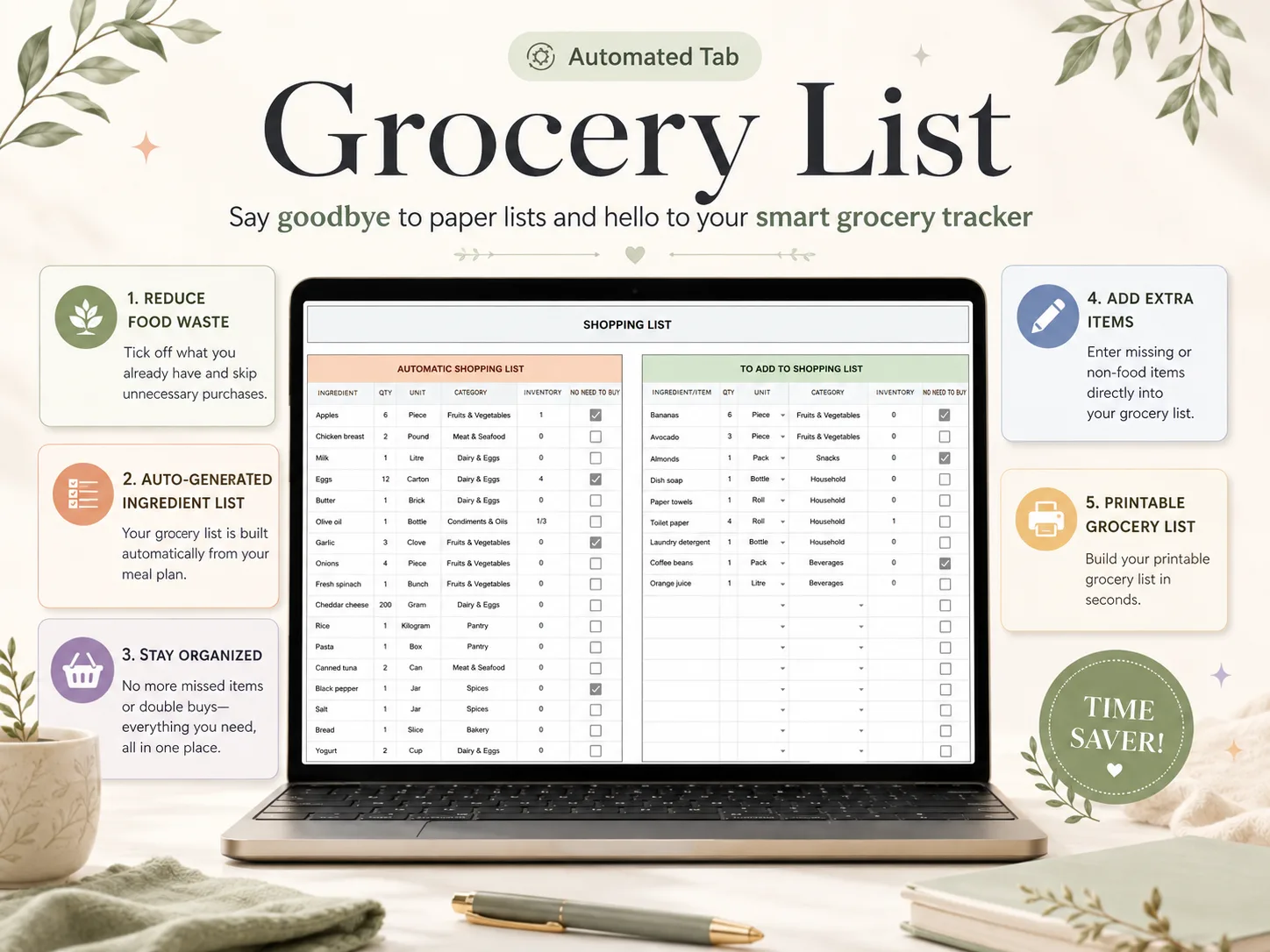
The grocery list should gather ingredients from the meals you selected, combine repeats where the quantities match, and show what is already on hand. In the product example, the Shopping List tab displays an automatic list beside a separate area for extra items.
Here are several entries visible in that sample list:
| Ingredient | Quantity | Unit | Store section | On hand | No need to buy |
|---|---|---|---|---|---|
| Apples | 6 | Piece | Fruits & Vegetables | 1 | Checked |
| Chicken breast | 2 | Pound | Meat & Seafood | 0 | |
| Milk | 1 | Litre | Dairy & Eggs | 0 | |
| Eggs | 12 | Carton | Dairy & Eggs | 4 | Checked |
| Garlic | 3 | Clove | Fruits & Vegetables | 0 | Checked |
Before shopping, check what is already in the refrigerator or pantry. The on-hand amount and no-need-to-buy box help you mark those items on the list.
- Week view: The Meal Planner tab keeps the seven days and meal slots together.
- Shopping view: The Shopping List tab shows the ingredients and what may already be on hand.
For a closer look at list layouts, the grocery list template guide compares the columns and shows the extra-items area.
Choose Meal Slots That Match Your Household
Use the meal slots you actually plan. A full grid can help a household that plans breakfasts, lunches, dinners, and snacks. It can feel like busywork if you only need to settle dinner.
Start with the question that causes the most friction. If dinner is the daily decision, make dinner the most visible row. If packed lunches need planning, give them a column. If breakfasts repeat, write a short default instead of copying the same meal into seven cells.
The meal planner example has four meal rows and a separate leftovers row. That leaves a clear place for the meals that carry forward. You can use the space for a prep note instead, such as “move chicken to fridge” or “use the open spinach.” Keep notes short enough to read at a glance.
Leave one flexible space
Plans change. An open evening can absorb a late workday, a meal out, or a dinner that moves from another day. You do not need to fill every cell to have a complete plan.
Put repeat meals where they help
Some households repeat breakfast or have the same lunch on several days. A template can show that pattern once as a default or repeat it in the grid. Choose the version that makes the week quickest to understand.
Use leftovers as a planned meal
When a dinner is likely to leave another meal, mark that in the planner. It helps the person shopping see why the following evening has a lighter plan. The sample week marks four leftover nights; use fewer or more based on what your household actually eats.
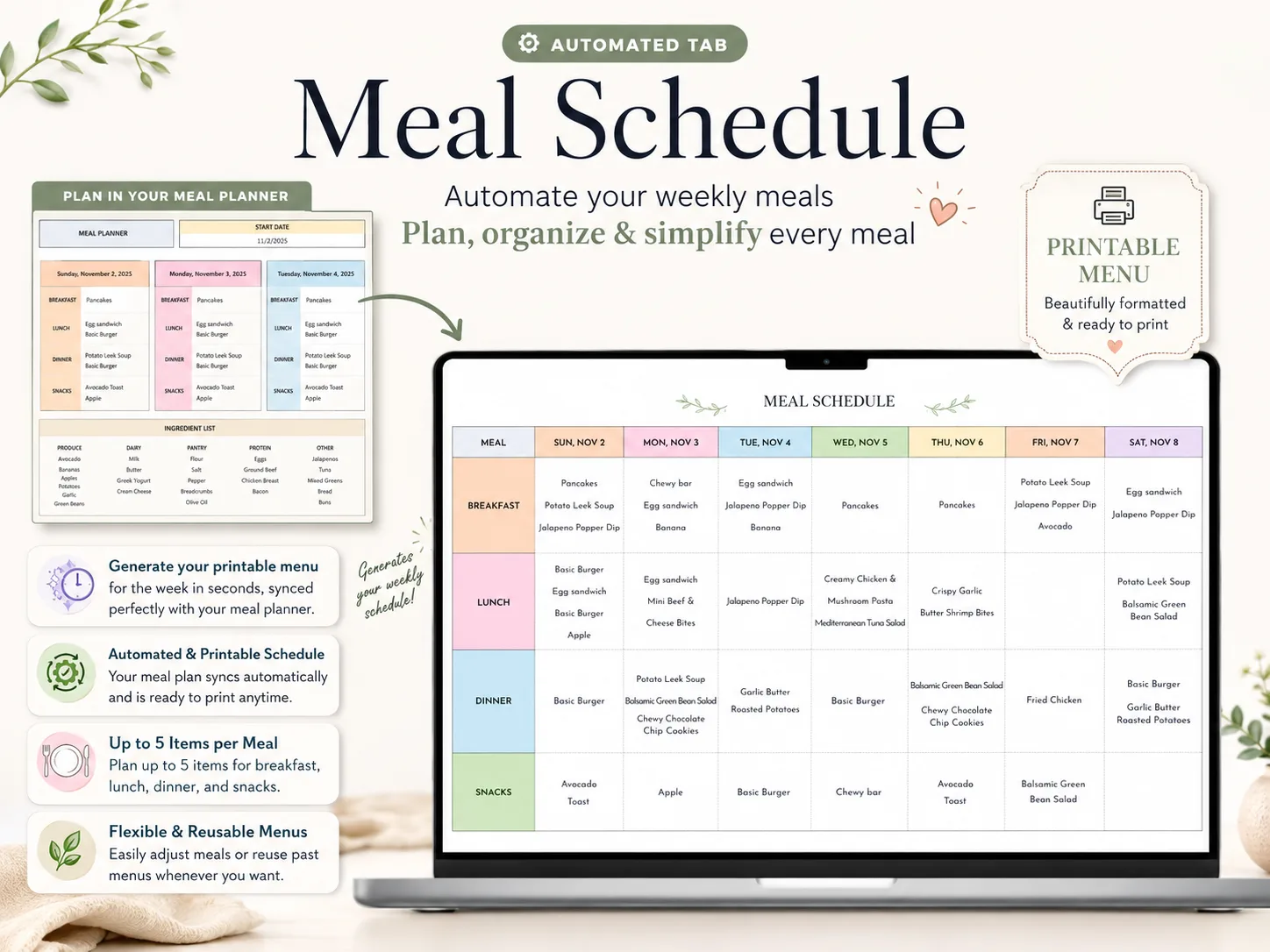
- Schedule view: The Meal Schedule tab makes the household's week easy to scan.
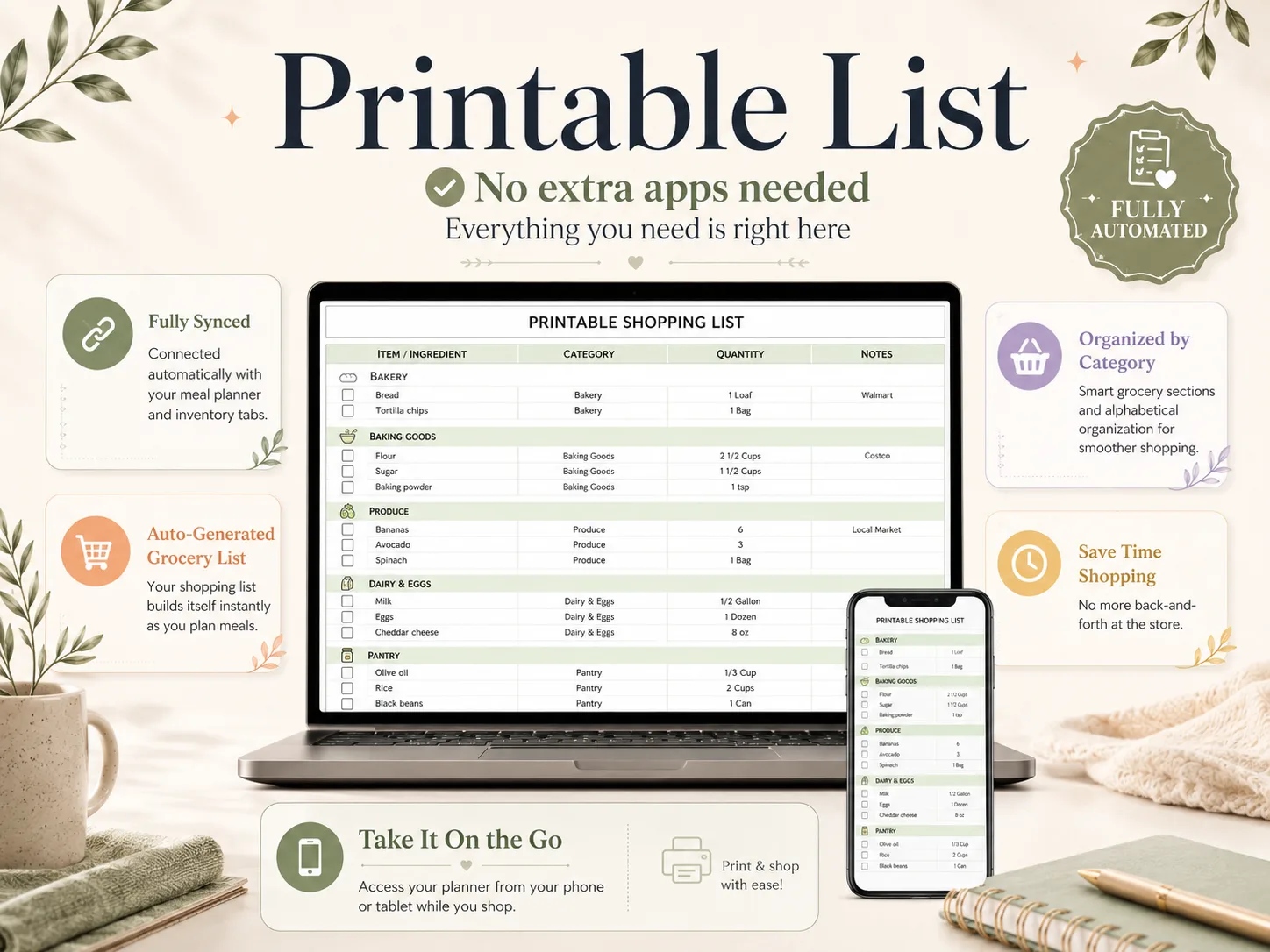
- Print view: The Printable Shopping List tab gives the shopper a page to take along.
Make a Blank Weekly Meal Planner Template in a Spreadsheet
A blank spreadsheet can work well if you keep the setup small. Create one row per day, add columns for the meals you plan, and place the grocery list on another tab or page. You can add dropdowns for saved recipes after the layout feels right.
- Choose the first day of your week. Match the grid to when you plan and shop.
- Add only the meal columns you use. Dinner alone is fine; breakfast, lunch, dinner, and snacks can all fit when needed.
- Add one flexible row. Use it for leftovers, prep notes, or an open evening.
- Keep recipe names consistent. If you want a dropdown, Google explains how to create an in-cell dropdown list in Sheets. Microsoft explains the same setup for drop-down lists in Excel.
- Build the grocery list from the week. Combine repeated ingredients, include quantities and units, then check what is already in the kitchen.
- Print one test page. Google Sheets lets you choose a sheet or selected cells in its print settings. In Excel, define a print area for the part of the sheet you want on paper. Adjust the page before you rely on the layout for the week.
The spreadsheet route takes more setup if you want formulas to connect recipes and groceries. Ultimate Meal Planner is available for Excel and Google Sheets as a one-time spreadsheet by Cosmo Suite, not a subscription.
Make the Plan Easy to Read at Home or in the Store
A template is useful only when the person cooking can find the next meal quickly. Use day labels, familiar recipe names, and a layout that does not force you to zoom in to read it.
On paper, a landscape page often gives the week more horizontal space. Print a test copy and check that the grocery list has enough room for handwriting. In a spreadsheet, freeze or repeat the day labels if the sheet extends beyond one screen. Keep recipe names short, but clear enough that another person knows what they mean.
Decide where the list will be used. If one person shops with a printed page, make the list large enough to mark by hand. If the shopper uses a phone, avoid tiny columns and long notes. A digital sheet can be printed from Google Sheets or adjusted in Excel, so the kitchen and shop do not need the same view.
What Makes a Weekly Meal Planner Work After Sunday
A weekly plan lasts when it is easy to update after the first change. Keep the grocery list connected to the meals, leave space for an unplanned evening, and carry only the useful parts into the next week.
Check the calendar before choosing meals. Put the quickest dinners on the busiest evenings. Save a meal that needs more steps for a night when someone can cook without rushing.
Review the pantry before shopping. The sample Shopping List tab includes inventory and a “No need to buy” checkbox. Use those fields to mark ingredients that are already covered. A meal planner spreadsheet that connects the week to the grocery list can keep those two steps together.
Carry forward only what you will reuse. A family favorite can return next week. A recipe that did not suit the schedule can stay in the recipe book without taking a spot on the next plan.
Change the week without rebuilding it. Move a meal when plans shift, then check the list for ingredients you no longer need. A linked spreadsheet makes that update easier because the planner and list share the same choices.
Where Ultimate Meal Planner Fits
Ultimate Meal Planner is a one-time spreadsheet by Cosmo Suite. Its Meal Planner and Meal Schedule tabs show the week, while the Recipe Book, Recipe Finder, and Recipe Tags tabs hold the recipes the plan can use. The Shopping List and Inventory tabs connect the shop to what is already in the kitchen.
The sample week in this article comes from the product's Meal Planner and Shopping List visuals. The planner has 15 tabs across Setup & Dashboard, Recipes, Meal Planner, Food Inventory, and optional Wellness sections. It is available for Excel and Google Sheets. It does not import recipes from websites.
If you want a ready-made weekly meal planner and grocery list in one spreadsheet, you can review the product details before deciding. You can also build a simpler grid yourself with the steps above.
How We Made This
The Cosmo Suite team built Ultimate Meal Planner, which appears in the screenshots. Methodology: we transcribed visible menu labels and list entries from its Meal Planner and Shopping List visuals; we did not fill gaps with assumptions. Spreadsheet setup and printing instructions were checked against Google Docs Editors Help and Microsoft Support on 14 October 2026. The example is a product demonstration, not a meal recommendation. For company details, see About, the editorial policy, and Contact.
Frequently asked questions
What should a weekly meal planner template include?
Start with seven days and the meal slots your household uses. Add a place for leftovers, a grocery list, and a short note for prep or thawing. Leave unused slots blank so the page stays easy to scan.
How do I make a weekly meal plan for a family?
Choose familiar meals first, then spread them across the week. Add one flexible or leftover night, check the calendar for busy evenings, and make the grocery list from the meals you chose.
Should I plan breakfast, lunch, and dinner for every day?
Only plan the meals that help your household. If breakfast repeats, write it once as a default. If lunches depend on leftovers, leave those cells open until dinner plans are set.
How do I turn a meal plan into a grocery list?
Write down the ingredients for the selected meals, combine repeated items, add quantities and units, then check what is already in the pantry. A linked spreadsheet can build that list from the recipes you select.
Is a printable or spreadsheet better for weekly meal planning?
A printable works well when you want a simple page on the fridge. A spreadsheet is useful when you want saved recipes, a reusable week, and a list connected to those choices. Pick the format you will keep using.
Can I print a meal planner from Google Sheets or Excel?
Yes. In Google Sheets, choose the sheet or cells you want, then use File and Print to set the page layout. Excel also lets you choose a print area and page settings before printing.
What do I do when plans change midweek?
Move the meals that still fit, leave a flexible night open, and update the grocery list before shopping. A plan is easier to use when it can bend around a late evening or an unexpected invitation.