Meal Planner Template: One Sheet From Recipes to Grocery List
Meal planner template guide: the 4 parts a plan needs, a worked week with its grocery list, and which format (printable, doc, sheet or app) fits your kitchen.
By Ultimate Meal Planner by Cosmo Suite · Editorial policy
Published · 6 min read
It's Sunday, 4pm, and the fridge is half empty. You open three recipe tabs, a notes app and last week's grocery list. Forty minutes later you still don't know what Wednesday looks like.
Most people in that spot assume they need more recipes. Usually the gap is somewhere else. A meal planner template is a reusable layout that plans your week of meals, and it only helps when your recipes, week, grocery list and pantry sit in one place and update each other.
This guide shows what a working template contains, how the common formats compare, and what a planned week looks like when the list builds itself.
Before You Plan: the key takeaways
- A good meal planner template is four parts: recipes, a weekly grid, a grocery list and a pantry list.
- A weekly grid on its own answers only "what's for dinner."
- A spreadsheet can link all four parts. A printable can't.
- Five familiar dinners are enough to start.
What a Meal Planner Template Has to Do
A meal planner template should get you from "what do we eat this week" to a finished shopping list without retyping anything.
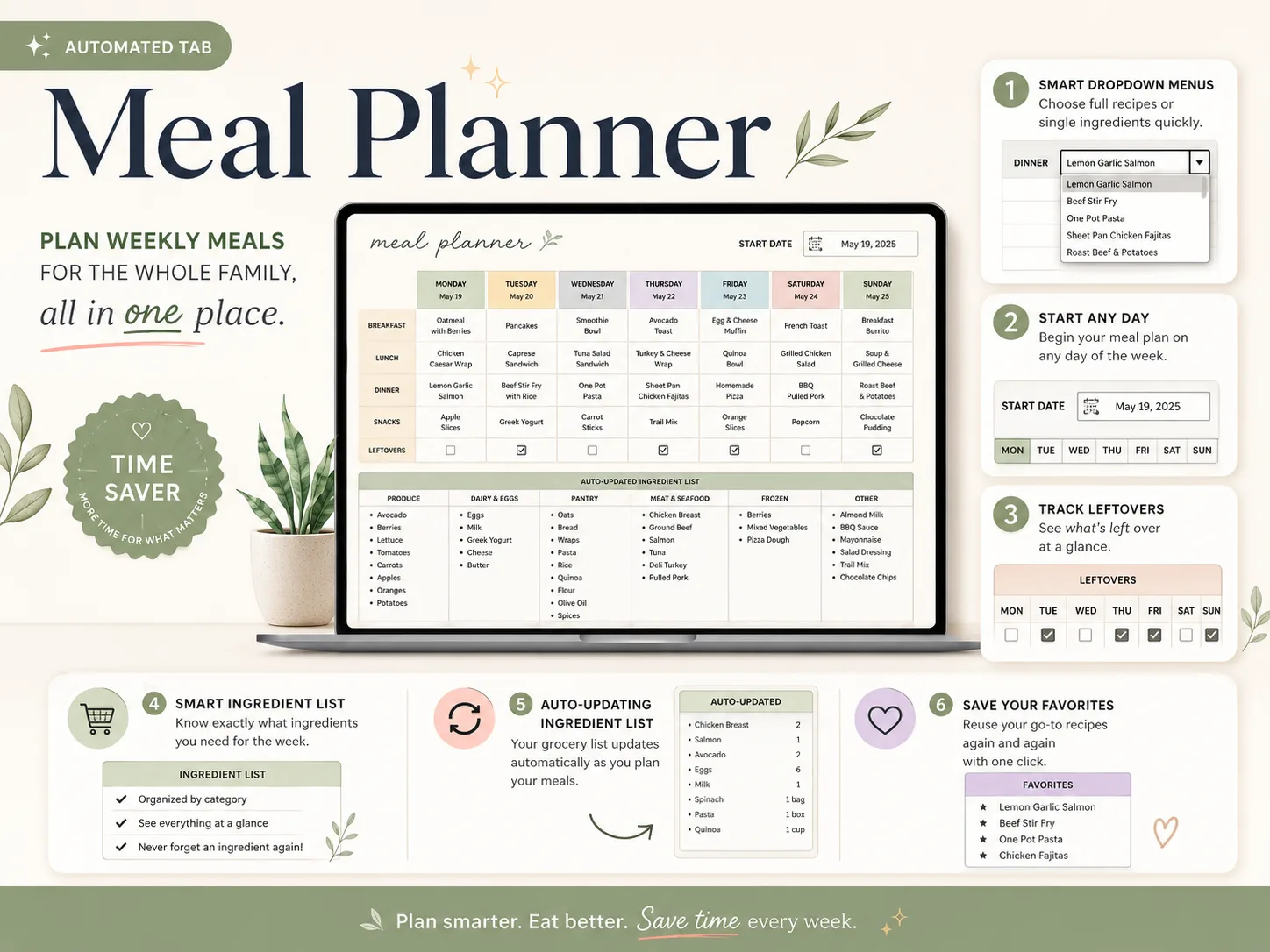
[Original data] Here is the sample week inside the Meal Planner tab of Ultimate Meal Planner, dinners only. Four of the seven nights are ticked as leftovers, so three of the seven dinners get cooked fresh and the rest stretch further.
| Day | Dinner | Leftovers ticked |
|---|---|---|
| Monday | Lemon Garlic Salmon | No |
| Tuesday | Beef Stir Fry with Rice | Yes |
| Wednesday | One Pot Pasta | No |
| Thursday | Sheet Pan Chicken Fajitas | Yes |
| Friday | Homemade Pizza | Yes |
| Saturday | BBQ Pulled Pork | No |
| Sunday | Roast Beef & Potatoes | Yes |
In the sheet, the same tab sorts the week's ingredients under Produce, Dairy & Eggs, Pantry, Meat & Seafood, Frozen and Other. Nobody typed that list. It came from the meals chosen above it.
Meal Planner Template Formats at a Glance
The format decides whether the list can build itself. This table compares the four you'll meet in search results.
| Format | Builds the grocery list? | Searches your recipes? | Cost | Good for |
|---|---|---|---|---|
| Printable PDF | No, you write it | No | Free to low | A loose plan on the fridge |
| Google Docs or Word table | No | No | Free | A tidy one-off week |
| Spreadsheet (Sheets, Excel) | Yes, with formulas | Yes, with a recipe tab | One-time or free | Weekly planners who want the loop closed |
| Subscription app | Yes | Yes | Monthly or yearly | People who clip recipes from websites |
Printables dominate the search results for this keyword because they're free and look nice. They're also static, which is where the Sunday retyping comes from.
The Four Parts of a Meal Planner Template That Works
[Unique insight] Nearly every template in the results is a layout, a page to fill in. Think of a loop instead: recipes feed the week, the week writes the list, the pantry trims the list, and what you cooked goes back into your recipe favorites. Each part below is one link in that loop.
Recipe Book: Where Every Week Starts
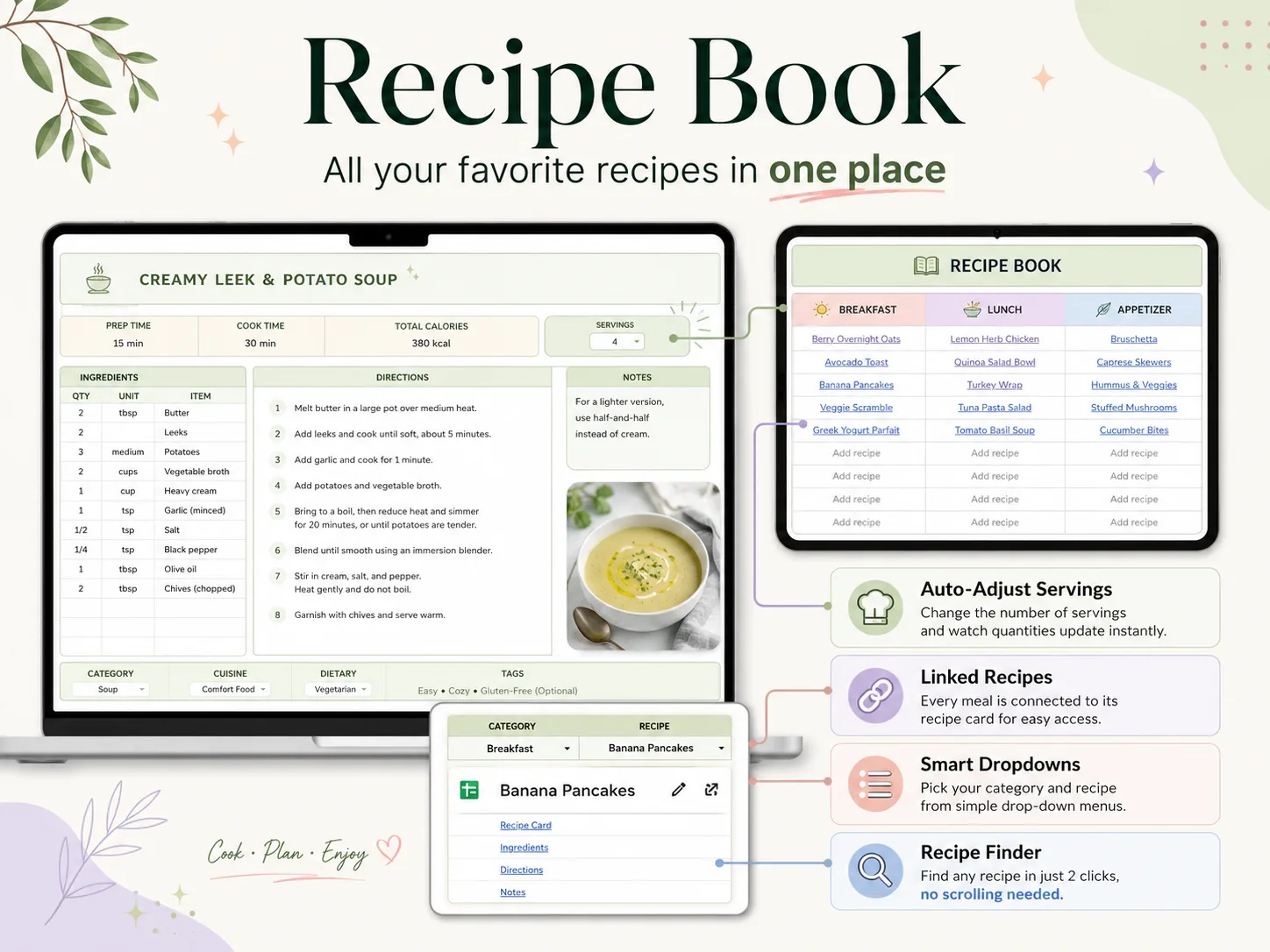
A recipe book is a single list of the meals your household really cooks, with ingredients and quantities attached. That's what lets the week pull from it.
In Ultimate Meal Planner the Recipe Book holds up to 1,000 recipes, with a Recipe Card tab, a Recipe Finder and tags. Change the servings on a card and the quantities update.
Good for: collectors with recipes scattered across notes, screenshots and bookmarks.
Weekly Plan: One Screen, Seven Days
The weekly plan is the grid you look at on Monday morning. It should show the whole week at once, with a start day you choose and room for leftovers.
Dropdown menus keep it fast. In Google Sheets, a drop-down list in a cell lets you pick a meal instead of typing it, and the same idea powers the meal dropdowns in the Meal Planner tab. Each meal slot takes up to 5 items.
Good for: anyone who wants the week decided before Monday starts.
Grocery List: The Part That Should Write Itself
The grocery list is where a template pays for itself. If you retype ingredients, you've only made a nicer notebook.
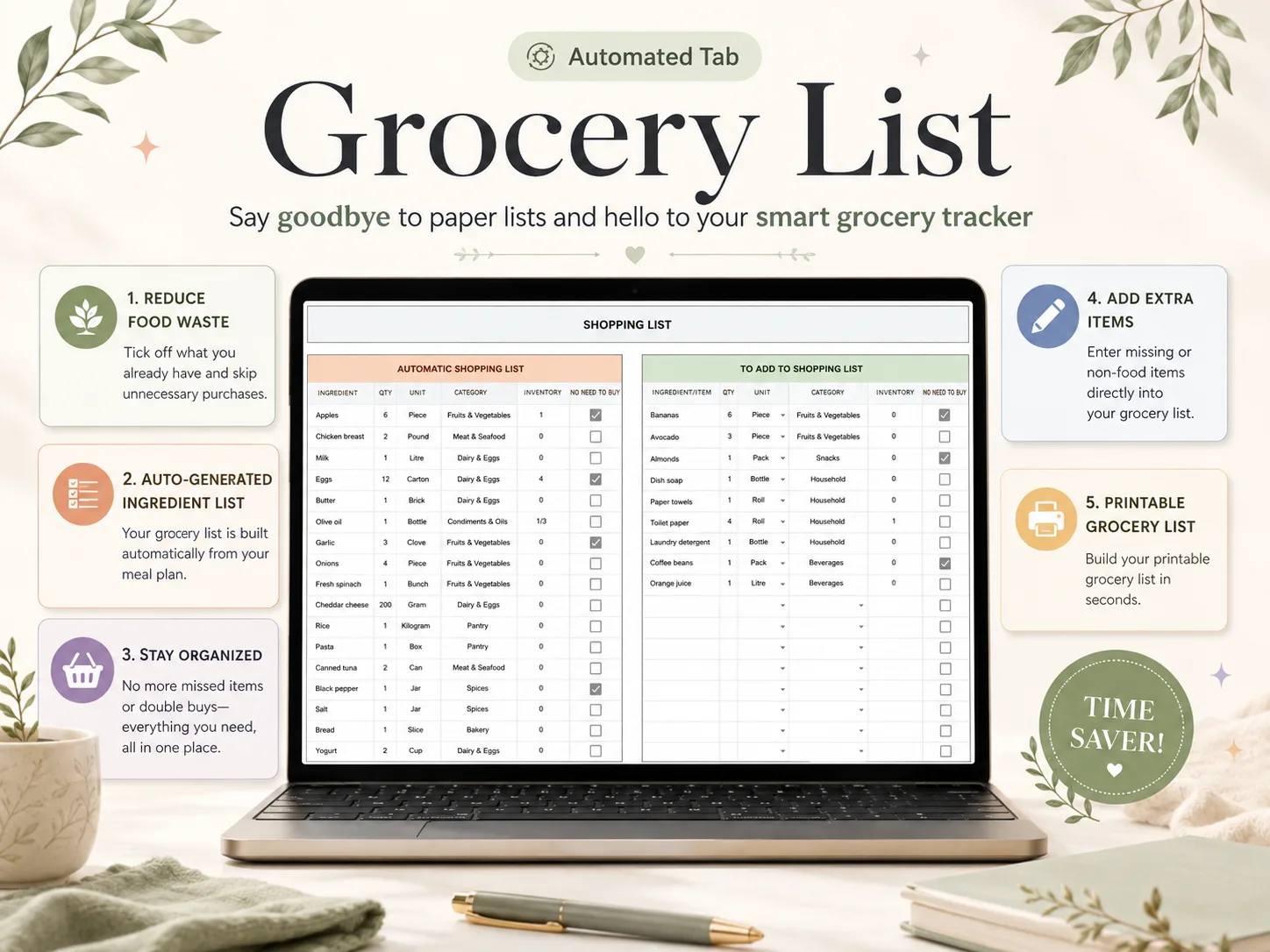
A list that builds from your meals sorts by store section and keeps a "no need to buy" box for things you already have. A second area takes the items no recipe covers, such as dish soap or coffee.
Good for: shoppers who forget the second thing on the list, and buy the same thing twice.
Pantry Inventory: Check Before You Buy
A pantry list is the quiet fourth part, and it's the one most printables skip. It records what's in the fridge, freezer and pantry so the shopping list only asks for what's missing.
In the Inventory tab, ticking an item adds it to the shopping list. That works both ways, so a half-empty jar becomes a line on Saturday's list in one click.
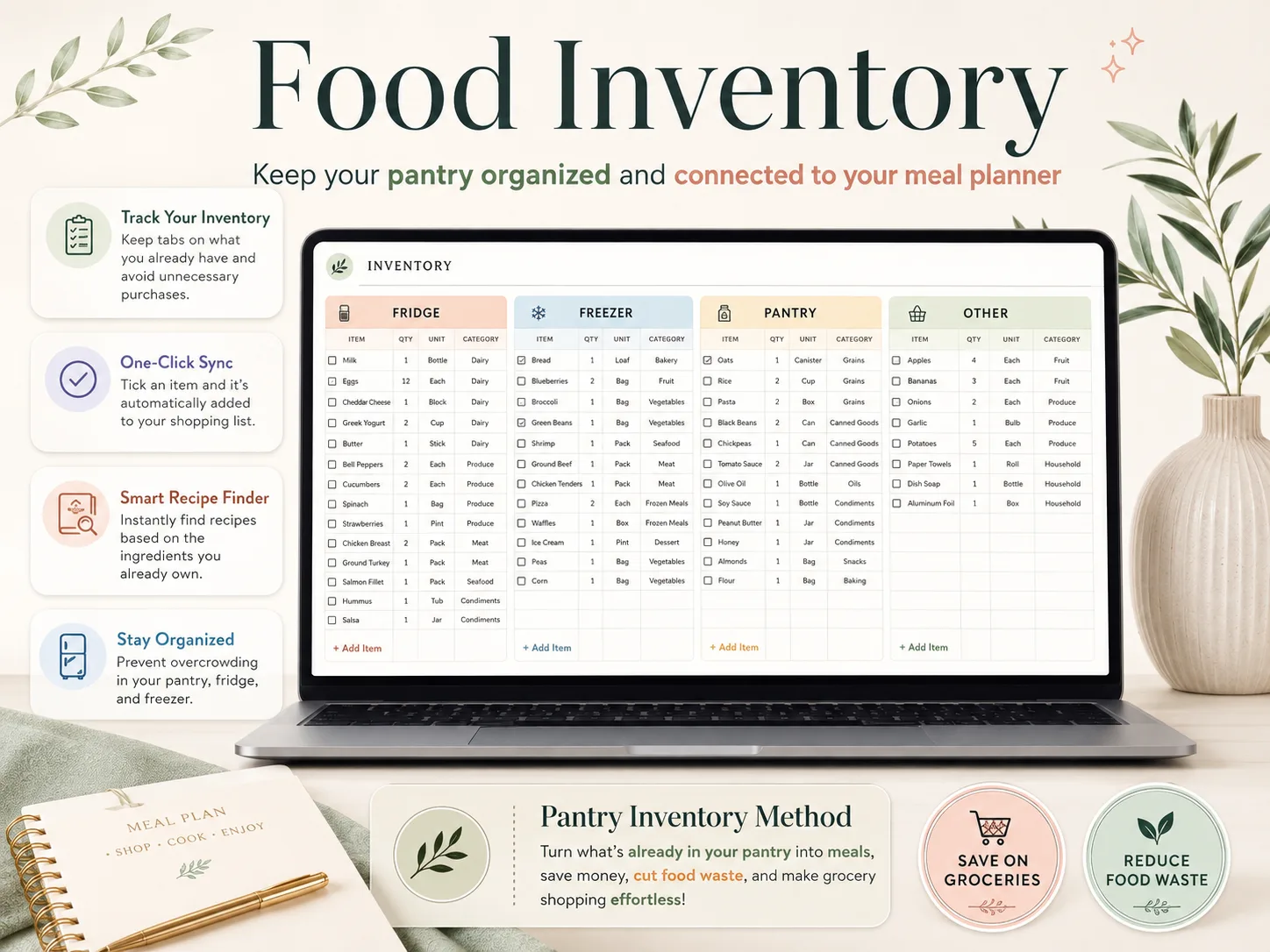
Good for: households that find three open jars of the same sauce at the back of a cupboard.
How to Set Up Your First Week
Skip the perfect system on day one. One planned week is enough, and these five steps get you there in one sitting.
- List five dinners you already eat. Skip the new recipes for now.
- Put them in the recipe book with their ingredients and the usual serving count.
- Pick a start day and fill each dinner slot from the dropdowns.
- Mark your leftover nights. Put them right after the biggest cook.
- Open the grocery list, tick what's already in the pantry and shop from the rest.
Next week, swap two dinners and keep three. A recipe book that grows slowly beats one built in a weekend and abandoned.
What Actually Keeps a Meal Plan Going
Plans usually stall at the shopping list and the leftovers.
Shop from the list, not from the plan. A plan says what you'll cook. Only the list says what's missing. Ticking the pantry first stops duplicate buys, and the USDA estimates 30 to 40 percent of the US food supply goes to waste, partly because people buy or cook more than they need.
Place leftover nights early. The USDA's food safety service says leftovers keep three to four days in the refrigerator. A big Monday cook can cover Tuesday, but not Saturday. Freeze the rest, or plan a new meal.
Repeat what works. Your family's favorites are the cheapest plan you'll ever write. Save them once and drop them back into any week.
How We Made This
The Cosmo Suite team wrote this guide and built Ultimate Meal Planner, which appears in the screenshots. Methodology: the sample week and tab details were read from the template itself. The USDA figures were fact-checked against the linked pages on 5 October 2026, and our editorial rule is to name the source for every number. Check those pages before you rely on food-safety timings. You can read more about us on the site's About page, and if you spot a mistake, use the Contact page to tell us.
Where Ultimate Meal Planner Fits
Ultimate Meal Planner is a one-time spreadsheet by Cosmo Suite, not a subscription.
Meal planning bogs down in the loop between recipes, week, list and pantry, which a plain layout doesn't close. A meal planner spreadsheet with a recipe book, weekly plan and automatic grocery list closes it. It has 15 tabs in 5 sections: Setup & Dashboard, Recipes, Meal Planner, Food Inventory and Wellness.
The Wellness tabs are optional and can be hidden. It also includes a printable weekly menu and a printable shopping list, plus a setup PDF and a video tutorial. You can plan from a ready-made meal planner and grocery list template in Excel or Google Sheets. The sheet doesn't import recipes from websites, so you type or paste your own.
Frequently asked questions
What should a meal planner template include?
Four things: a place for your recipes, a weekly grid, a grocery list and a pantry list. A weekly grid alone only answers what's for dinner. The other three answer what to buy and what you already have, and those are the questions that eat your Sunday.
Is a printable or a spreadsheet better for meal planning?
It depends on whether the list needs to stay in sync. A printable is free and fine for a loose plan. A spreadsheet earns its place once you want the grocery list to build from the plan, because paper can't add up ingredients for you.
Does Google Docs have a meal plan template?
Yes, Google Docs offers templates, and you can also build a table in a blank doc. A doc is a static page, though. It won't total your ingredients or search your recipes, so most people who plan weekly move to Google Sheets.
How do I make my own meal planner?
Start with a seven-column grid, one column per day, and rows for the meals you actually cook. Add a recipe list on a second tab and a grocery list on a third. Then link them by hand or with formulas, which is the slow part.
How long can planned leftovers stay in the fridge?
The USDA's food safety service says leftovers keep three to four days in the refrigerator. That's why a week plan works best with leftover nights placed early, and the rest of the cooked food frozen or eaten within that window.
Can I use one template for one person and for a family?
Yes, if the servings change the quantities for you. Ultimate Meal Planner adjusts a recipe's quantities when you change its servings, so the same recipe card works for two plates or six without redoing the math.
What is the fastest way to start meal planning?
Pick five dinners your household already eats, put them in a recipe book and fill one week. Don't hunt for new recipes yet. A planner that builds the grocery list from those five meals gets you to the store the same afternoon.
